The golden path
This document describes the core workflow: five stages from uploading inputs to selecting a model. The stages map to the product's screens.
flowchart LR
    A["1 · Bring inputs"] --> B["2 · Generate candidates"]
    B --> C["3 · Review & rate"]
    C --> D["4 · Calibrate the judge"]
    D -->|not satisfied| C
    D --> E["5 · Evaluate & decide"]
    E -->|new cases, new models| B
Ratings serve two purposes: they build the golden dataset and provide the calibration material for the LLM judge. The stage 3–4 loop ends when the judge's agreement with your ratings reaches a level you accept.
Stage 1 — Bring inputs
A model request is composed of up to three layers, which change at different rates:
| Layer | What it is | Example | Changes |
|---|---|---|---|
| System prompt | Instructions: how the model should behave | "You are a support agent for Acme. Classify the ticket as billing, fraud, or technical. Reply with the category only." | Per app / feature |
| Context | Reference material the model reads | Policy doc, product catalog, schema, the retrieved chunks in a RAG app | Per app or per case |
| Variables | The dynamic data being processed | The ticket, the user message, the record | Per call |
clean-evals must know which layer is which, so setup starts with one question:
"How does your app talk to the model?"
The answer decides the path:
Path A: "I send complete, already-assembled requests." Your code merges instructions, context, and data into a single payload and sends it. To evaluate that faithfully, export those finished requests and upload them, one per row. clean-evals sends the rows unchanged. Use this path to evaluate what production sends today, such as replayed request logs.
Path B: "Same setup, different data." The system prompt (and usually the context) is reused across calls; only the ticket or message varies. Enter the shared layers once and upload only the variables:
- System prompt. Paste the instructions your app sends.
- Context (optional). Choose how it applies:
- Shared. Paste or upload it once.
- Per-case. Your upload has a
contextcolumn. This fits RAG applications, where cases carry their own retrieved material. - Both. The shared base and the per-case column are concatenated.
- Test cases. Upload the rows of variables.
- Preview. Before anything is saved, the screen shows the assembled request for the first case with the three layers visually distinguished, next to the parsed case table. Models receive the request as shown.
Path C: "My users already did the reviewing."
Production interactions — with the user's edits, follow-up corrections,
regenerations, and accepts attached — can be ingested directly as
telemetry. Each interaction derives into a
pre-rated candidate case: stage 1 and a first pass of stage 3, mined
from real traffic. Conversations become chat-shaped cases whose prior
turns replay verbatim during eval runs.
Requests are assembled the way providers expect them: the system prompt is sent in the system role; context and variables are rendered into the user message through a visible, editable template that defaults to:
{case} renders the case's variables — raw text when there is a single
field, JSON when there are several. Named placeholders ({ticket},
{customer_tier}) are available when field-level placement matters.
Why the layers stay separate (Path B)
- Golden answers survive prompt changes. The expected output pairs with the variables, not the assembled string — so you can rewrite the system prompt later and re-evaluate against the same locked dataset. In Path A, changing your prompt requires a new dataset.
- Prompt iteration reuses the same machinery. With the system prompt stored as its own field, comparing prompt v2 to prompt v3 on the same cases works the same way as comparing model A to model B.
- Cost estimates are more accurate. A 30-page shared context dominates token cost; knowing it is a shared prefix also lets cost projection account for provider prompt caching.
- Review shows only the case data. Stage 3 shows the reviewer the ticket itself; the repeated instructions are omitted.
Upload format (both paths)
One row = one test case (a "case" in the UI). Two reserved keys; remaining columns are variables:
| Key | Meaning |
|---|---|
id |
Optional stable name for the case (auto-generated if absent) |
context |
Optional per-case context (Path B, per-case or both) |
How many cases? Start with 10 to 50. Fewer than 10 gives noisy scores; more than 50 makes stage 3 review slow. Grow the dataset after the flow works end to end.
Common sources: production logs, support exports, QA spreadsheets. If the data contains PII, scrub it first — see Production data and PII.
UI for this stage: a two-question wizard (request shape, then context shape), inline examples and a downloadable template per path, and the assembled-request preview before anything is saved.
Stage 2 — Generate candidates
You picked models you're considering (say claude-haiku-4-5-20251001,
gpt-4o-mini-2024-07-18, gemini-2.0-flash-001). clean-evals runs the dataset
through the candidate models once and stores the outputs.
Outputs are not scored at this stage. They are the material for selecting golden answers in stage 3.
- Cost guard: the run shows a cost estimate before it starts and respects
max_cost_usd. - Outputs are stored per
(case, model)and survive refreshes; generation can be re-run for new models without touching existing ratings.
Stage 3 — Review & rate
One case is shown at a time:
┌─────────────────────────────────────────────────────────────┐
│ ticket_001 · "My card was charged twice for the same order" │
├─────────────────────────────────────────────────────────────┤
│ Output A                        Output B                    │
│ "Billing → Duplicate charge"    "Category: billing_dispute" │
│ ☆☆☆☆☆  [feedback…]              ☆☆☆☆☆  [feedback…]          │
│                                                             │
│ Output C                                                    │
│ "billing"                                                   │
│ ☆☆☆☆☆  [feedback…]                                          │
│                                                             │
│ [✓ Pick best]   [✎ Edit and use]   [Skip case]              │
└─────────────────────────────────────────────────────────────┘
This is human review (what other tools call annotation). Per case you do three things:
- Rate the outputs 1–5. Outputs are shown blind — model names are hidden until after you rate, so the model's identity does not influence the rating.
- Write feedback where a rating needs explaining. "Too verbose", "wrong category, this is fraud not billing", "perfect format". This text becomes judge calibration material in stage 4.
- Pick the best output (or edit one, or write your own) and lock it. The locked answer is the expected output — the ground truth — for that case.
Progress is shown as 17/40 locked. Once fully locked, the dataset is
golden — versioned and immutable from then on; edits bump the version
so old runs stay comparable.
Stage 4 — Calibrate the judge
Deterministic tasks (classification, extraction) can stop here — exact_match
or json_field_match against the golden answer is cheap and objective.
Open-ended tasks (summaries, drafts, rewrites) need LLM-as-a-judge. An uncalibrated judge scores by its own default criteria; calibration (also called judge alignment) derives the judge's criteria from your stage 3 review:
- The expected output, your ratings, and your written feedback become few-shot examples in the judge prompt: this output got 2/5 because "too verbose"; this got 5/5.
- The judge then re-scores the same candidate outputs you already rated.
- The UI shows agreement: judge score vs your rating, case by case, plus one overall number (% within ±1 point, and Cohen's kappa — the standard chance-corrected agreement statistic; ≥ 0.6 is the commonly used bar).
- Where you disagree with the judge, add feedback on that case and re-calibrate. Repeat until agreement reaches a level you accept.
The judge config (model, prompt, few-shot examples, version) is stored with the dataset, so future runs are scored with the configuration you approved.
Stage 5 — Evaluate & decide
Stage 5 is the eval run (LangSmith and Braintrust call this an experiment): the selected models run against the golden dataset, scored by the calibrated judge or exact match. The Decision UI shows:
- Leaderboard — score, pass rate, p95 latency, $/run, $/correct.
- Three recommendations — max accuracy, best price/performance, lowest cost, with the math written out.
- Case results — what passed, what failed, expected vs got, one click to the full input/golden/answer view.
- Cost projection — monthly cost at your real traffic volume.
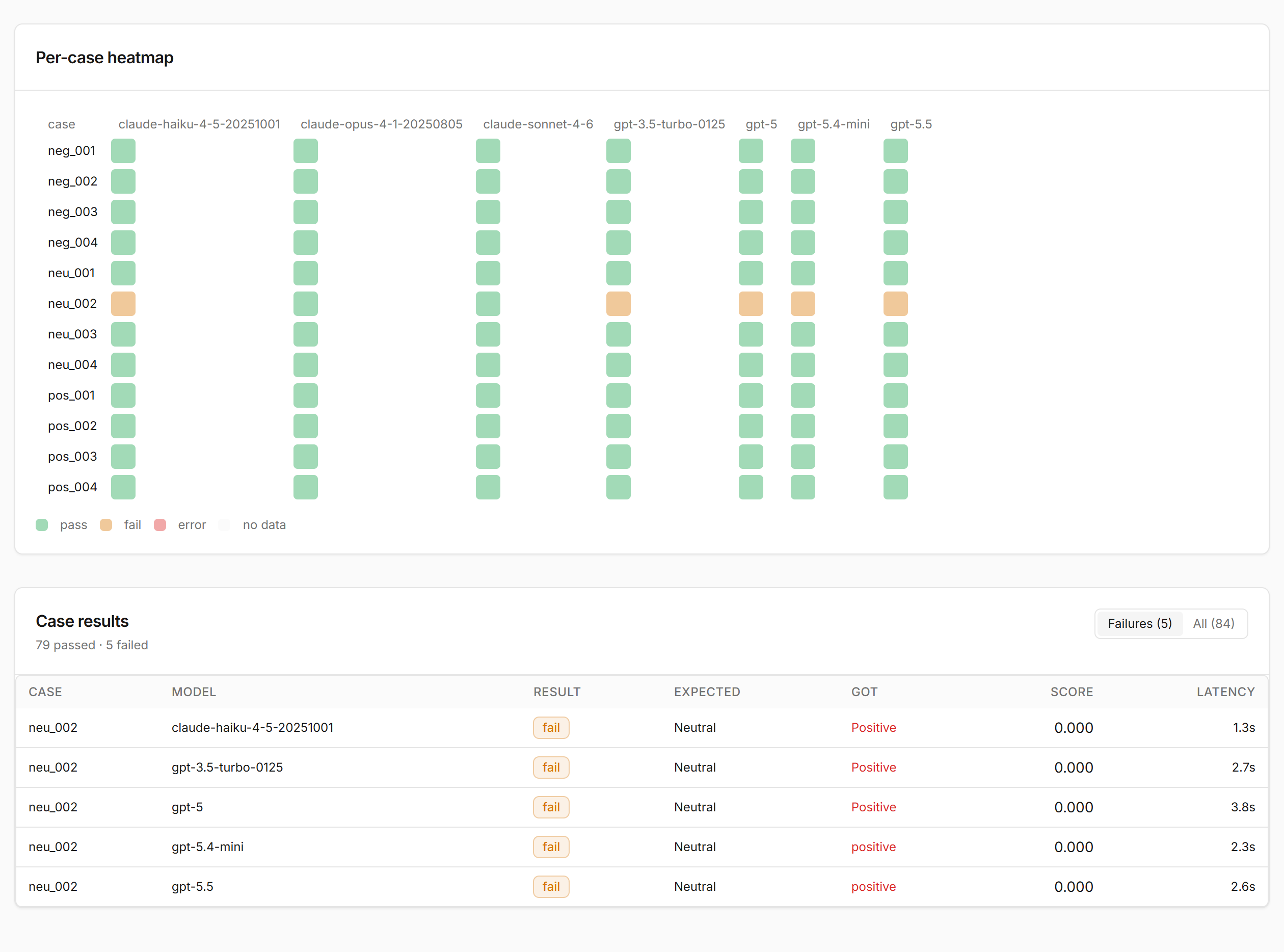
To evaluate a new model later, add it and rerun stage 5 against the same locked dataset and judge. Scores remain comparable because the dataset and judge configuration are unchanged.
Implementation status
All five stages are built and connected in the web UI:
| Stage | Location |
|---|---|
| 1 · Bring inputs | Upload wizard with both request shapes, prompt spec stored on the dataset, assembled-request preview |
| 2 · Generate candidates | "Generate candidates" in the Dataset Builder, or clean-evals generate on the CLI |
| 3 · Review & rate | Blind side-by-side outputs with 1–5 ratings, written feedback, and pick-best-locks-golden |
| 4 · Calibrate the judge | "Calibrate" in the Dataset Builder, or clean-evals calibrate; agreement (exact, within ±1, kappa) is stored with a versioned judge config |
| 5 · Evaluate & decide | Run launcher on the Dataset Builder and Runs pages, ending in the leaderboard and recommendations |
The dataset carries a prompt spec (request shape, system prompt,
shared context, user-message template), and stages 2–4 persist to the
candidate_outputs, ratings, and judge_configs tables.
Terminology
clean-evals uses the shortest widely understood terms. If you're coming from another tool, this is the mapping:
| clean-evals | Also known as | Used by |
|---|---|---|
| case | test case, example, record | promptfoo (tests), LangSmith ("examples"), Braintrust ("records") |
| variables | vars, input variables, inputs | promptfoo (vars), LangSmith, Braintrust (input) |
| system prompt | instructions, developer message | Anthropic/OpenAI APIs |
| expected output | reference output, ground truth, ideal, label | LangSmith, Braintrust (expected), OpenAI Evals (ideal) |
| golden dataset | golden set, ground-truth dataset | industry-wide |
| scorer | evaluator, grader, assertion | LangSmith ("evaluators"), OpenAI Evals ("graders"), promptfoo (assert) |
| LLM judge | LLM-as-a-judge, autorater | industry-wide |
| calibrate | align (the judge), judge alignment | LangSmith ("Align Evals") |
| review & rate | human review, annotation, labeling | LangSmith ("annotation queues") |
| run | experiment | LangSmith, Braintrust |